Anyone good with tablet software

iceman440

Member
AnabolicLab.com Supporter
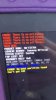
my daughters tablet booted up with this. You can’t restart it, or perform a hard reboot. Basically have to wait for it to die then start it up. Is the hard drive crashed. Any help is appreciated

B7BBF01C-D550-41EB-9A49-AFC2F95D61E5.jpeg
 
Did you try this?
Steps:

  1. Turn off your phone/tablet
  2. Hold down Power, Home, and Volume Up buttons at the same time.
  3. Keep holding those 3 buttons until Samsung Logo Appears.
  4. Let go of Power button and keep holding down (Home & Power buttons).
  5. You should now boot into Recovery Mode.
I had to do this with an older Samsung tablet when it would not boot.
If you can't get into recovery mode most likely the flash memory is failing or the boot image is corrupt. Better yet take it to a shop to see if they can fix it.
 
Did you try this?
Steps:

  1. Turn off your phone/tablet
  2. Hold down Power, Home, and Volume Up buttons at the same time.
  3. Keep holding those 3 buttons until Samsung Logo Appears.
  4. Let go of Power button and keep holding down (Home & Power buttons).
  5. You should now boot into Recovery Mode.
I had to do this with an older Samsung tablet when it would not boot.
If you can't get into recovery mode most likely the flash memory is failing or the boot image is corrupt. Better yet take it to a shop to see if they can fix it.

I can’t get it to turn off with a h combination of buttons. It’s indefinitely stuck on that boot screen till it runs out of power
 
Doing a bit of digging this tablet appears to been rooted with Odin and somehow it failed. Was your daughter messing around with rooting this device? Another thing I can think of is that Samsung uses Odin as a fastboot loader and the OS image somehow got corrupted thus the errors. You might need to take it in for repair.
 
I find it hilarious that A: there's a FAP lock, and B: that the FAP lock us off.

Seems a low-key commentary on the entirety of society, how we relate to tech and the interebs at this point.
 
Softbricked / bootloop

just google "fix bootloop" with the name of whatever device it is or what OS you run on it. Should find a guide somewhere, and should take about 5 minutes to fix.
 
You will probably need to flash the ROM onto the device. That's if a copy of it exists online, and it has to be the one for that exact model.

i don't do Samsung, so i can't walk you through flashing, but you may be able to find information on XDA.

If you can't find the ROM, you now have an expensive, but fashionable paperweight.
 
Softbricked / bootloop

just google "fix bootloop" with the name of whatever device it is or what OS you run on it. Should find a guide somewhere, and should take about 5 minutes to fix.

That's no boot loop, that's full on boot failure. The screenshot says the boot partition can't be found, which means it was erased. That would require flashing to put it back.
 
You will probably need to flash the ROM onto the device. That's if a copy of it exists online, and it has to be the one for that exact model.

i don't do Samsung, so i can't walk you through flashing, but you may be able to find information on XDA.

If you can't find the ROM, you now have an expensive, but fashionable paperweight.
I been on XDA and it's been a help a few times with a cranky old Samsung tablet I once had. Had gotten the utility to flash a new ROM image and got it working but lost whatever I had on it.
 
I did find a site that has instructions for flashing Samsung devices:

https://samsungodin.com/how-to-use-odin/

The Samsung Odin tool is a good tool used it once before to re-flash my old Samsung tablet (Samsung Galaxy Tab 4) that was configured for Sprint network. Haven't used it in ages.

For getting the firmware there's numerous sites to obtain the Samsumg firmware for your tablet. You need to know the model number of it to get the right firmware package for it.

For the Samsung SM-T377R4:

ᐉ SM-T377R4 - Samsung Galaxy Tab E Samsung Updates — [EN] | Samsung-Firmware.Org

(you need to create a login. Use fake info if necessary)

You WILL lose all data on it if you re-flash the firmware. Be aware.
 
I been on XDA and it's been a help a few times with a cranky old Samsung tablet I once had. Had gotten the utility to flash a new ROM image and got it working but lost whatever I had on it.

i have a cheap chinese tablet that i tried flashing a custom ROM onto. At some point, not knowing what i was doing, i wiped all of the partitions. Pretty much junk now.
 
i have a cheap chinese tablet that i tried flashing a custom ROM onto. At some point, not knowing what i was doing, i wiped all of the partitions. Pretty much junk now.
Yes that's why you have to be careful going about it and the instructions tell not to repartition the device but leave the partitions as is.

I also managed to trash a cheapo tablet as well in my first attempts reloading a stock Android ROM onto it to replace the rather shit build on it.
 
Guys no shit. Turned it back on after it died, did same thing. Did the hard reboot and it worked?

Tried this like 8 times prior but apparently number 9 was a charm.... lol
 
Guys no shit. Turned it back on after it died, did same thing. Did the hard reboot and it worked?

Tried this like 8 times prior but apparently number 9 was a charm.... lol

That's strange. My only thought is that the flash memory where the partitions sit may have some corruption or intermittent failure issues.

Unless newer versions of Android have the ability of rolling back changes to the boot process? i know with my phone, i can only gain temp root, but it's unstable. Once crashed or restarted, it goes back to default.
 
I can only think the flash has gotten flaky but hopefully this will sort itself out. Good that you got the tablet working again and hopefully it will work still

You should look into a replacement if this happens again.
 
Yeah Im at a blank. I’m usually really good with this kind of stuff, but it legit wouldn’t let me do anything.

Thinking maybe once it turned its self off it did some sort of reset. My daughter thinks I’m a hero now hahah
 
Yeah Im at a blank. I’m usually really good with this kind of stuff, but it legit wouldn’t let me do anything.

Thinking maybe once it turned its self off it did some sort of reset. My daughter thinks I’m a hero now hahah
You are her hero and don’t ever forget that!
 
@iceman440 tablet still working? if it is hopefully it is a fluke but I'd recommend taking it in to have the flash storage checked out. If it is flaky, you should be able to replace the device if it is under warranty still as that's a fairly recent device.
 
Back
Top
