I'm gonna smash this F#*cking thing!

HIGHRISK

Member
Ok some of you know I purchased a drone. So I have my micro as card. I put it in my MacBook Pro. Got the video but it won't play in the regular size screen. And only play when I right click then select quick view. When I try to open it in quick player it says error:mad:. But here's the fucked up part. Somehow yesterday I converted the .AVI file to a .m4v file and it works like it's supposed to. BUT I DONT KNOW HOW THE FUCK I DID IT!! I can't do it again to save my life. 4 fucking hours I've been trying!!:mad::mad::mad::mad::mad:

I didn't download shit or any app to do it either. Can someone please tell my dumbass how I did this!
When I download it from my SD card this is how the file it looks on my desk top and is useless.
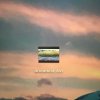
image.jpeg
It will only play in this little screen
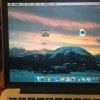
image.jpeg


Somehow I converted it yesterday and it works and it looks like this. I have no idea how. Please explain it to me in DUMMY TERMS please.
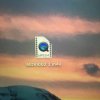
image.jpeg


I NEED HELP!!! Any idea @Ickyrica ??
In more then one way also lol

Thanks fuckers.
 
You need some kind of video converter obviously. You probably already have one on your mac. Try the right click menu. Search "converter" on your computer. Also, you could try to drag into iTunes and it may give you options for converting to a useable format. I dont have a mac anymore or I could help more. You probably already tried some of this so maybe no help.
Edit:
I think I used vlc player. Just try to drag that file to any video player you have, one should give you an option.
 
You need some kind of video converter obviously. You probably already have one on your mac. Try the right click menu. Search "converter" on your computer. Also, you could try to drag into iTunes and it may give you options for converting to a useable format. I dont have a mac anymore or I could help more. You probably already tried some of this so maybe no help.
Edit:
I think I used vlc player. Just try to drag that file to any video player you have, one should give you an option.
I downloaded vlc player today and it does allow me to view it. The frustrating part is i converted it without any converter but I don't know how I did it. That's what I'm trying to figure out. Appreciate the info I'll try dragging it into iTunes.
Thanks
 
Yeah, somehow. Lol.. I'm about to smash my pc cuz I don't have a mac anymore so I can't remember how. Just use your drone to film the smashing of your mac, send destruction file to me, I'll transcode it on my pc for ya. And have your drone pick up and fly u the decoded footage home to watch. Can't get much easier than that.
 
Yeah, somehow. Lol.. I'm about to smash my pc cuz I don't have a mac anymore so I can't remember how. Just use your drone to film the smashing of your mac, send destruction file to me, I'll transcode it on my pc for ya. And have your drone pick up and fly u the decoded footage home to watch. Can't get much easier than that.
Lmfao! Deal lol. I'll try it tomorrow I think 4 hrs is enough for me today. I'll update tomorrow. Thanks again
 
The Mac probably has save as, or export as, as options that you used earlier. Try to open the AVI again and see which menu options you have.

FYI, AVI isn't a file format, it's a container of files.
 
This might make you scratch your head. I got the vlc player yesterday. But my OCD won't let me use that converter yet. I'm trying to figure out how I changed the first video without any converter. I know it sounds stupid but I'm really on a mission to figure out how I did that. I hate losing and I'm losing right now. I'll probably give up today and just use the damn vlc player lol. Appreciate it bud
 
The Mac probably has save as, or export as, as options that you used earlier. Try to open the AVI again and see which menu options you have.

FYI, AVI isn't a file format, it's a container of files.
That's what I'm thinking. But how in the hell do I do that. When I open the quick time player it gives me an error. So I can't even open it to export it. Or is there another step I'm missing? Do I need to put it in a file first?
 
When you originally go to save the file to your pc you have options like where you want to save the file. Look around when you originally save, you may have a drop down menu where you can change the format of the file. You may have inadvertently changed the format during your attempts.
 
That's what I'm thinking. But how in the hell do I do that. When I open the quick time player it gives me an error. So I can't even open it to export it. Or is there another step I'm missing? Do I need to put it in a file first?

Hold down the CONTROL key while clicking on the file, that'll give you a pop up with options re which app to open with, take a look and see what choices you have. Should be something that can open it.

VLC will definitely do it, don't recall which export options are available from that app.
 
How you liking your drone? Tough lil things to fly in any wind. 2 hour charge, 10 mins fly time, i need a simulator for practice lol
 
How you liking your drone? Tough lil things to fly in any wind. 2 hour charge, 10 mins fly time, i need a simulator for practice lol
So far it's been cool as fuck. The videos I've got are cool also. What sucks is the camera is fixed on these drones. So videos are pretty shaky.I only crashed it once and that was into a tree far away where I didn't have good depth perception. I'm already looking into a better one lol. It's addicting for sure. I bought 4 more batteries and more chargers. Every room you walk in there batteries charging everywhere lol.
 
Back
Top