sp5der - QUALITY US DOMESTIC

This actually isn't a bad idea at all...let me get all setup and going with it. I know I'm going to nerd out and will happily share whatever templates I create or can find.
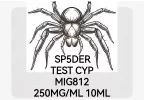
I did the same thing, and you'll learn how to play with the images. Some parts like an overlay image (the spider) I used fell outside the perimeter margins. So all you have to do is move to where you want, center everything with the app. In this case I cut out the hind quarters of the spider to ensure the text was legible.

I simply searched the Internet for B/W spider drawing, or 1D spider image. So on you get the idea.
 
I did the same thing, and you'll learn how to play with the images. Some parts like an overlay image (the spider) I used fell outside the perimeter margins. So all you have to do is move to where you want, center everything with the app. In this case I cut out the hind quarters of the spider to ensure the text was legible.

I simply searched the Internet for B/W spider drawing, or 1D spider image. So on you get the idea.
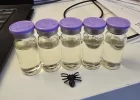
Thanks for the tips on that! I actually already downloaded the app too because I just wanted to get in there and see what all it has. I'm just saying, wife's gonna come home today and be like "why the fuck are the light switches labeled?" Then I'll show her the update to the stash with these beautiful labels and she's gonna think I'm a fuckin' hero...or tell me to finish unloading the dishwasher haha!
 
Thanks for the tips on that! I actually already downloaded the app too because I just wanted to get in there and see what all it has. I'm just saying, wife's gonna come home today and be like "why the fuck are the light switches labeled?" Then I'll show her the update to the stash with these beautiful labels and she's gonna think I'm a fuckin' hero...or tell me to finish unloading the dishwasher haha!
No problem and if your like me... Visuals help.

So this image is the 40x30 transparent and the B1 will auto identify the labels. The darker area is the perimeter for what will be shown on the label, I overlay the image, bump it up, center, then add the text and center also.

Hope that helps, but messing with it and spitting out a bunch of trial and error is more fun.

Screenshot_20260112_070422_NIIMBOT.webp
 
Back
Top