heavydutygorilla
Member
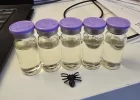
mine arrives today and I'm beyond excited to get my stash labeled!Just the B1, and those are 40x30 transparent.
Follow along with the video below to see how to install our site as a web app on your home screen.
Note: This feature may not be available in some browsers.
mine arrives today and I'm beyond excited to get my stash labeled!Just the B1, and those are 40x30 transparent.
Yall need to start a thread with all your label templates uploaded so those of us with no creativity can steal your ideas.mine arrives today and I'm beyond excited to get my stash labeled!
This actually isn't a bad idea at all...let me get all setup and going with it. I know I'm going to nerd out and will happily share whatever templates I create or can find.Yall need to start a thread with all your label templates uploaded so those of us with no creativity can steal your ideas.
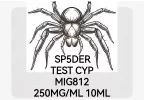
I did the same thing, and you'll learn how to play with the images. Some parts like an overlay image (the spider) I used fell outside the perimeter margins. So all you have to do is move to where you want, center everything with the app. In this case I cut out the hind quarters of the spider to ensure the text was legible.This actually isn't a bad idea at all...let me get all setup and going with it. I know I'm going to nerd out and will happily share whatever templates I create or can find.
Thanks for the tips on that! I actually already downloaded the app too because I just wanted to get in there and see what all it has. I'm just saying, wife's gonna come home today and be like "why the fuck are the light switches labeled?" Then I'll show her the update to the stash with these beautiful labels and she's gonna think I'm a fuckin' hero...or tell me to finish unloading the dishwasher haha!I did the same thing, and you'll learn how to play with the images. Some parts like an overlay image (the spider) I used fell outside the perimeter margins. So all you have to do is move to where you want, center everything with the app. In this case I cut out the hind quarters of the spider to ensure the text was legible.
I simply searched the Internet for B/W spider drawing, or 1D spider image. So on you get the idea.
No problem and if your like me... Visuals help.Thanks for the tips on that! I actually already downloaded the app too because I just wanted to get in there and see what all it has. I'm just saying, wife's gonna come home today and be like "why the fuck are the light switches labeled?" Then I'll show her the update to the stash with these beautiful labels and she's gonna think I'm a fuckin' hero...or tell me to finish unloading the dishwasher haha!

Has not yet been brewed or shipped I believe, so no feedback yet but should be happening pretty soon.How is the PIP on the TNE100? I assume crashing is an issue?
My bad. Saw it on the list. Will def wait for some impressions. Need something to mix with my inJ Anadrol PWOHas not yet been brewed or shipped I believe, so no feedback yet but should be happening pretty soon.
I will have an answer for you a few hours after Jano gets me back raw purity results for itHow is the PIP on the TNE100? I assume crashing is an issue?
Man, i need to take my label game up a notch. I didnt realize i could add images. Damn. Haha.No problem and if your like me... Visuals help.
So this image is the 40x30 transparent and the B1 will auto identify the labels. The darker area is the perimeter for what will be shown on the label, I overlay the image, bump it up, center, then add the text and center also.
Hope that helps, but messing with it and spitting out a bunch of trial and error is more fun.
View attachment 372917
Actually super helpful seeing this layout and comparing it to the photo you shared of it on the vials! Going to be playing with a few ideas and I'll post up my final results after the experimentation! Thanks again!No problem and if your like me... Visuals help.
So this image is the 40x30 transparent and the B1 will auto identify the labels. The darker area is the perimeter for what will be shown on the label, I overlay the image, bump it up, center, then add the text and center also.
Hope that helps, but messing with it and spitting out a bunch of trial and error is more fun.
View attachment 372917
Thanks brother gonna have to copy u and allgoodthings lolJust the B1, and those are 40x30 transparent.
No problem and if your like me... Visuals help.
So this image is the 40x30 transparent and the B1 will auto identify the labels. The darker area is the perimeter for what will be shown on the label, I overlay the image, bump it up, center, then add the text and center also.
Hope that helps, but messing with it and spitting out a bunch of trial and error is more fun.
View attachment 372917
Actually awesome, I just tested it, I copied and as soon as the app opens it recognized it as an option to use.In the niimbot app if you go to the “me” tab, then “my templates”, you can “share” templates.
It generates a string like this, that anyone can copy and then paste into the app to get the shared template.
【mast ent Devon(30*14)】,After copying this information⊙69652dfb352be51dabcba7ad⊙,OpenNIIMBOT。
Actually awesome, I just tested it, I copied and as soon as the app opens it recognized it as an option to use.
Here are these in case anyone would like to have them, or modify for their use.
【SP5DER TRENA(40*30)】,After copying this information⊙696541a29543f61b713e38b4⊙,OpenNIIMBOT。
【SP5DER TNE(40*30)】,After copying this information⊙696541c9253d9571b4421249⊙,OpenNIIMBOT。
【SP5DER TEST C(40*30)】,After copying this information⊙696541d9e5f7c12e3f36edda⊙,OpenNIIMBOT。
【SP5DER LADY T(40*30)】,After copying this information⊙696541ea253d9571b442124a⊙,OpenNIIMBOT。
Makes no difference printed on clear labels.I copied the TRA, does it not matter that the background of the spider is white?