


Here's a good article courtesy of EFF that explains how to set up a truly anonymous email account. Most people don't take into account all of these factors during account setup. This means their supposedly pseudo/anonymous email accounts are already compromised from the very beginning. Do it right to begin with. For all of those Safe-mail.net users seeking a new email service provider, this provides a chance to do it right.... (except do NOT use hushmail.)
Don't be a Petraeus: A Tutorial on Anonymous Email Accounts
Source: https://www.eff.org/deeplinks/2012/11/tutorial-how-create-anonymous-email-accounts
Tomorrow, as the Senate Judiciary Committee considershttp://www.digitaldueprocess.org/index.cfm?objectid=37940370-2551-11DF-8E02000C296BA163 the decades-oldhttps://ilt.eff.org/index.php/Privacy:_Stored_Communications_Act, the personal Inboxes and love lives of senior military and intelligence figures may be on that august body's mind. When the FBI pored through the personal lives of CIA Director David Petraeus, Paula Broadwell, Jill Kelly and General John Allen, citizens across the land began to wonder how the FBI could get that kind of information, both legally and technically.
So, just how do you exchange messages with someone, without leaving discoverable records with your webmail provider? This is an important practical skill, whether you need to use it to keep your love life private, to talk confidentially with a journalist, or because you're engaged in politics in a country where the authorities use law enforcement and surveillance methods against you.
The current state of anonymous communication tools is not perfect, but there here are some steps that, if followed rigorously, might have protected the Director of the CIA, the Commander, U.S. Forces Afghanistan, and their friends against such effortless intrusion into their private affairs.
Pseudonymous webmail with Tor
According to press reports, Broadwell and Petraeus used pseudonymous webmail accounts to talk to each other. That was a prudent first step, but it was ineffectual once the government examined Google's logs to find the IP address that Broadwell was using to log into her pseudonymous account, and then checked to see what other, non-pseudonymous, accounts had been used from the same IP address. Under current US law, much of this information receives inadequate protection, and could be obtained from a webmail provider by the FBI without even requiring a warrant.
Because webmail providers like Google choose to keep extremely extensive logs1, protecting your pseudonymous webmail against this kind of de-anonymization attack requires forethought and discipline.
You should use the throwaway address instead.
Download the Tor Browser Bundle
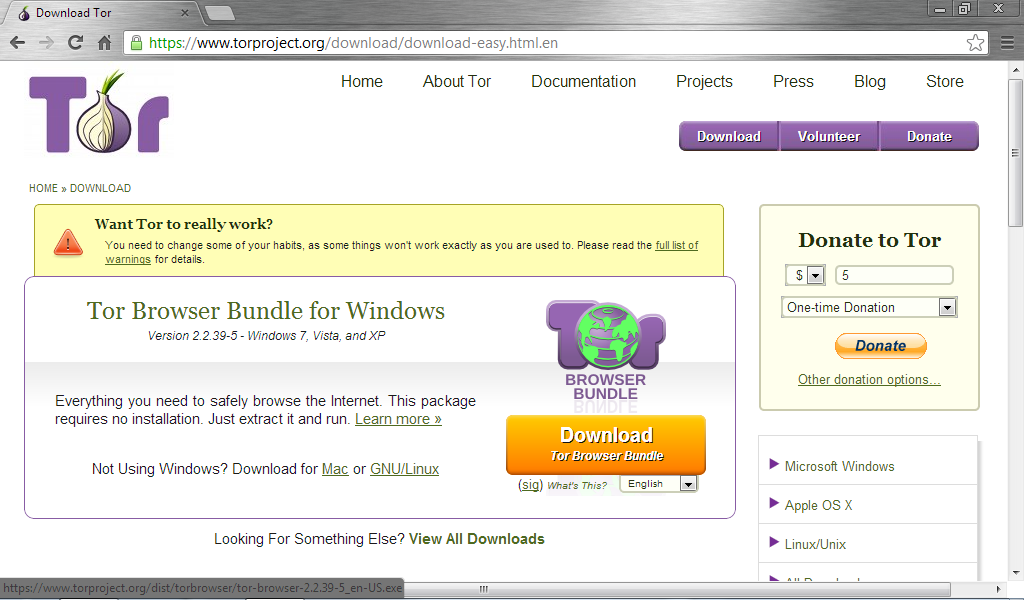
To use Tor, start by downloading the Tor Browser Bundle by going to Tor Download page: https://www.torproject.org/download/download-easy.html.en, shown in the screenshot below, and click on the Download button for the appropriate browser bundle for your operating system. The screenshot below shows the Tor Browser Bundle for Windows.
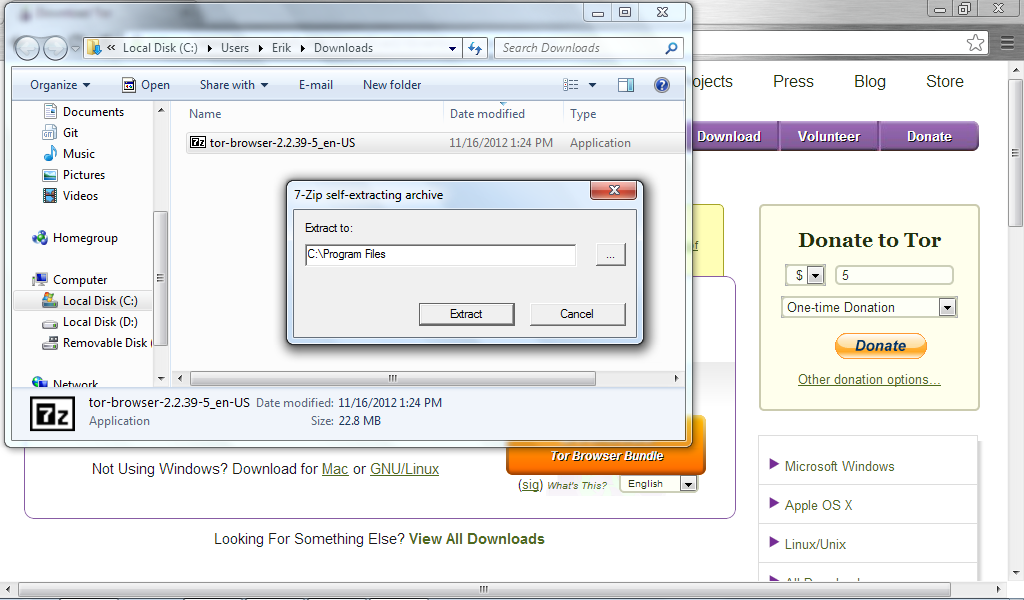
The Tor Bowser Bundle is a zip self-extracting archive. Click "extract" to extract the files from the archive.
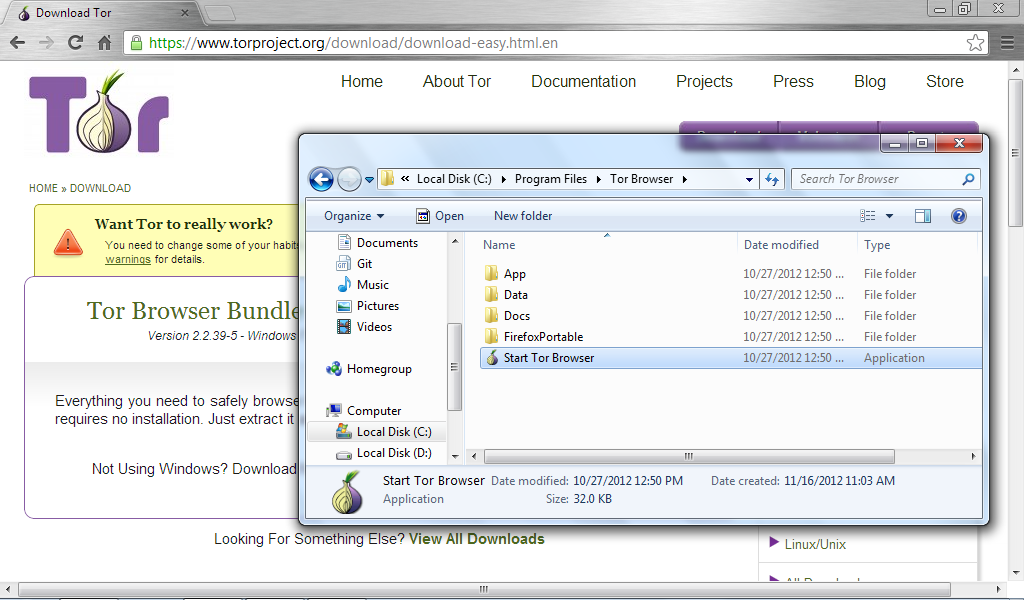
To start the Tor Browser in Windows, go to Local Disk-->Program Files-->Tor Browser and double click on "Start Tor Browser," shown in the screenshot below:
When the Tor Browser launches, it will automatically test itself to see if Tor is working correctly. If Tor is correctly anonymizing your traffic, it will display a message saying, "Congratulations. Your browser is configured to use Tor." It will also display the IP address that your traffic appears to be coming from. This is the IP address your webmail provider will see when you go to set up your webmail account.

Set Up A Webmail Account
Now that you have your Tor Browser up and running, use it to set up a new webmail account, ideally with a provider that you do not otherwise use. Using a separate webmail provider will help you to distinguish between your anonymous account and your regular email account. Hushmail allows users to set up new webmail accounts while using Tor to protect their anonymity, which is why we are using it in this tutorial. Note that Hushmail has a checkeredhistory, but it is the only webmail service we are aware of that allows the use of Tor in this way--something we'd like to see changed. Google tries to prevent people from signing up for Gmail accounts pseudonymously, and alternatives like Yahoo! Mail are missing HTTPS protection. Without both HTTPS and Tor at the time of creation and use, your account is not truly anonymous. As an added precaution, you may want to use public wifi at an Internet cafe or a library whenever you connect.
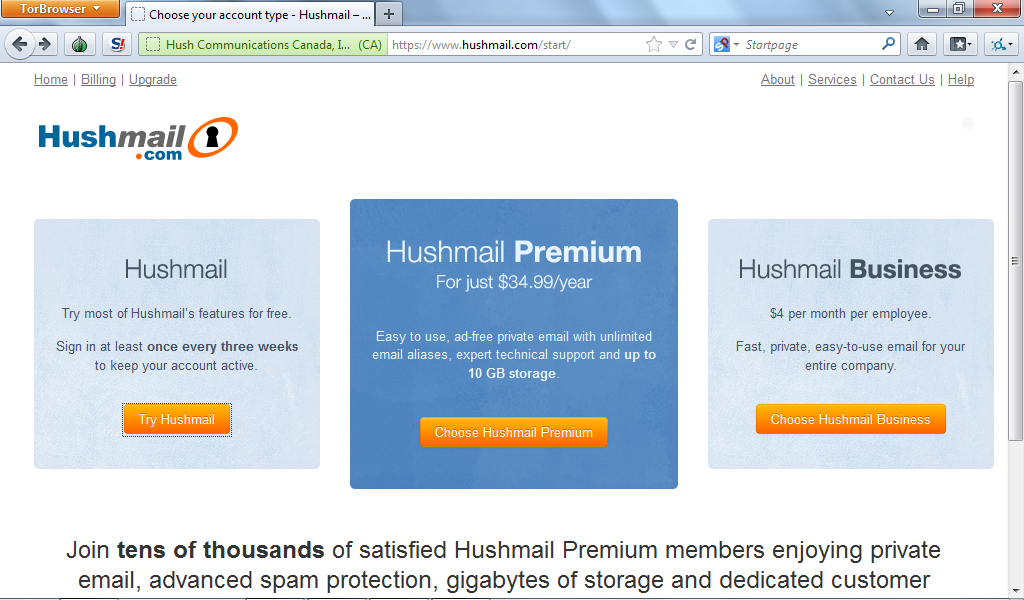
To set up your Hushmail account, go to https://www.hushmail.com/start, shown in the screenshot below, and click the "Try Hushmail" button, which will allow you to set up a free Hushmail account.
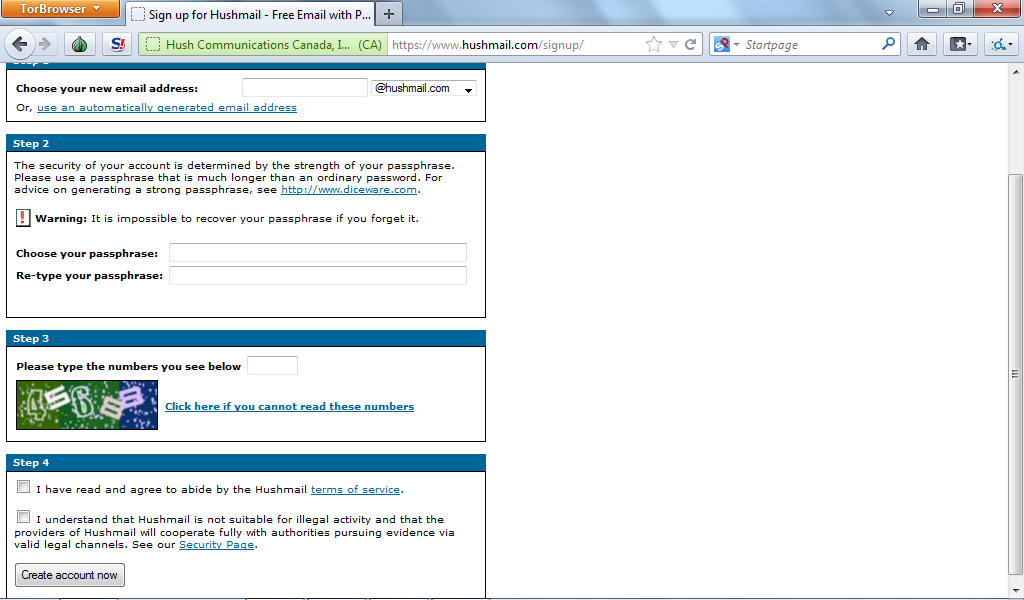
Fill in the form shown in the screenshot below. Remember to choose a strong password. You must also check a box acknowledging that Hushmail will cooperate fully with authorities pursuing evidence via valid legal channels. This means that, given a proper court order, Hushmail may give up metadata about your messages--the IP addresses you've been logging in from (luckily you use Tor every single time), the times you've logged into your webmail, and the email addresses of the people with whom you've been corresponding. Hushmail may even give up the contents of your messages to law enforcement, and has in the past as we note above, which is why you want tomake sure that your messages never contain any information that may give your identity away if you wish to remain anonymous. If you are concerned about law enforcement obtaining the contents of your emails from Hushmail, you should encrypt your email correspondence using OpenPGP.
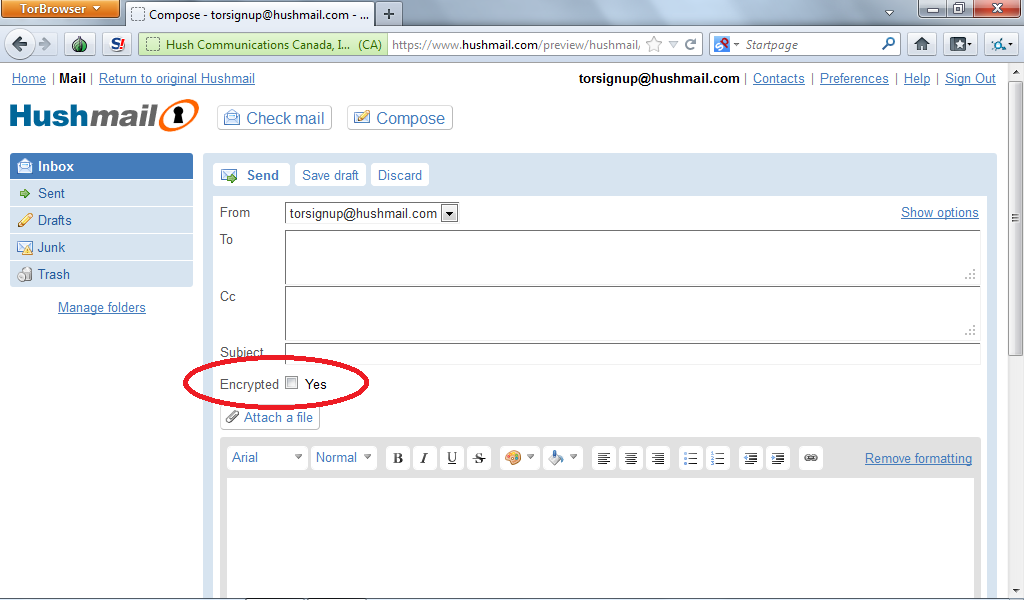
When you send messages via Hushmail, beware the "Ecrypt" checkbox, shown in the screenshot below.This is not end-to-end encryption like PGP. Hushmail will still have access to the plaintext of your email messages. This means that you are not safe from de-anonymization via the clues you type into your pseudonymous emails.
Using End-to-End Encryption With Your Pseudonymous Email Account
Setting up pseudonymous PGP/GPG in Hushmail is an complicated task that lies outside the scope of this tutorial. You are unlikely to do it safely unless you are quite technically sophisticated, and any mistakes could break the pseudonymity of your account. If you do want to attempt to do this, here are some considerations to bear in mind:
Anonymous online communication is a valuable tool for journalists, whistleblowers, dissidents, and Directors of the CIA. As you can see, it is still quite hard to do and do well, and few people will have the discipline necessary to ensure that their webmail provider can never disclose their IP address or inter-account linkages, because the provider will never see the identifying information in the first place. Technologists all over the world are hard at work, improving the usability of all sorts of anonymous online communications tools, and we look forward to the day when all people who need to exercise their freedom of expression can do so safely, simply, and anonymously.
Don't be a Petraeus: A Tutorial on Anonymous Email Accounts
Source: https://www.eff.org/deeplinks/2012/11/tutorial-how-create-anonymous-email-accounts
Tomorrow, as the Senate Judiciary Committee considershttp://www.digitaldueprocess.org/index.cfm?objectid=37940370-2551-11DF-8E02000C296BA163 the decades-oldhttps://ilt.eff.org/index.php/Privacy:_Stored_Communications_Act, the personal Inboxes and love lives of senior military and intelligence figures may be on that august body's mind. When the FBI pored through the personal lives of CIA Director David Petraeus, Paula Broadwell, Jill Kelly and General John Allen, citizens across the land began to wonder how the FBI could get that kind of information, both legally and technically.
So, just how do you exchange messages with someone, without leaving discoverable records with your webmail provider? This is an important practical skill, whether you need to use it to keep your love life private, to talk confidentially with a journalist, or because you're engaged in politics in a country where the authorities use law enforcement and surveillance methods against you.
The current state of anonymous communication tools is not perfect, but there here are some steps that, if followed rigorously, might have protected the Director of the CIA, the Commander, U.S. Forces Afghanistan, and their friends against such effortless intrusion into their private affairs.
Pseudonymous webmail with Tor
According to press reports, Broadwell and Petraeus used pseudonymous webmail accounts to talk to each other. That was a prudent first step, but it was ineffectual once the government examined Google's logs to find the IP address that Broadwell was using to log into her pseudonymous account, and then checked to see what other, non-pseudonymous, accounts had been used from the same IP address. Under current US law, much of this information receives inadequate protection, and could be obtained from a webmail provider by the FBI without even requiring a warrant.
Because webmail providers like Google choose to keep extremely extensive logs1, protecting your pseudonymous webmail against this kind of de-anonymization attack requires forethought and discipline.
You should use the throwaway address instead.
Download the Tor Browser Bundle
To use Tor, start by downloading the Tor Browser Bundle by going to Tor Download page: https://www.torproject.org/download/download-easy.html.en, shown in the screenshot below, and click on the Download button for the appropriate browser bundle for your operating system. The screenshot below shows the Tor Browser Bundle for Windows.
The Tor Bowser Bundle is a zip self-extracting archive. Click "extract" to extract the files from the archive.
To start the Tor Browser in Windows, go to Local Disk-->Program Files-->Tor Browser and double click on "Start Tor Browser," shown in the screenshot below:
When the Tor Browser launches, it will automatically test itself to see if Tor is working correctly. If Tor is correctly anonymizing your traffic, it will display a message saying, "Congratulations. Your browser is configured to use Tor." It will also display the IP address that your traffic appears to be coming from. This is the IP address your webmail provider will see when you go to set up your webmail account.
Set Up A Webmail Account
Now that you have your Tor Browser up and running, use it to set up a new webmail account, ideally with a provider that you do not otherwise use. Using a separate webmail provider will help you to distinguish between your anonymous account and your regular email account. Hushmail allows users to set up new webmail accounts while using Tor to protect their anonymity, which is why we are using it in this tutorial. Note that Hushmail has a checkeredhistory, but it is the only webmail service we are aware of that allows the use of Tor in this way--something we'd like to see changed. Google tries to prevent people from signing up for Gmail accounts pseudonymously, and alternatives like Yahoo! Mail are missing HTTPS protection. Without both HTTPS and Tor at the time of creation and use, your account is not truly anonymous. As an added precaution, you may want to use public wifi at an Internet cafe or a library whenever you connect.
To set up your Hushmail account, go to https://www.hushmail.com/start, shown in the screenshot below, and click the "Try Hushmail" button, which will allow you to set up a free Hushmail account.
Fill in the form shown in the screenshot below. Remember to choose a strong password. You must also check a box acknowledging that Hushmail will cooperate fully with authorities pursuing evidence via valid legal channels. This means that, given a proper court order, Hushmail may give up metadata about your messages--the IP addresses you've been logging in from (luckily you use Tor every single time), the times you've logged into your webmail, and the email addresses of the people with whom you've been corresponding. Hushmail may even give up the contents of your messages to law enforcement, and has in the past as we note above, which is why you want tomake sure that your messages never contain any information that may give your identity away if you wish to remain anonymous. If you are concerned about law enforcement obtaining the contents of your emails from Hushmail, you should encrypt your email correspondence using OpenPGP.
When you send messages via Hushmail, beware the "Ecrypt" checkbox, shown in the screenshot below.This is not end-to-end encryption like PGP. Hushmail will still have access to the plaintext of your email messages. This means that you are not safe from de-anonymization via the clues you type into your pseudonymous emails.
Using End-to-End Encryption With Your Pseudonymous Email Account
Setting up pseudonymous PGP/GPG in Hushmail is an complicated task that lies outside the scope of this tutorial. You are unlikely to do it safely unless you are quite technically sophisticated, and any mistakes could break the pseudonymity of your account. If you do want to attempt to do this, here are some considerations to bear in mind:
- You will need to make a new key just for your pseudonymous account and the other pseudonymous people you want to talk to will need to do the same
- You will need to figure out a way to exchange public key fingerprints with them. Your Hushmail accounts are probably good enough for this.
- You will need to make sure that all of the software you use to handle the key (intentionally or unintentionally) is always Torified
- If you use PGP normally for non-pseudonymous purposes, you will need to make sure that no PGP software uses or produces evidence of one key in the context of your other identity.
Anonymous online communication is a valuable tool for journalists, whistleblowers, dissidents, and Directors of the CIA. As you can see, it is still quite hard to do and do well, and few people will have the discipline necessary to ensure that their webmail provider can never disclose their IP address or inter-account linkages, because the provider will never see the identifying information in the first place. Technologists all over the world are hard at work, improving the usability of all sorts of anonymous online communications tools, and we look forward to the day when all people who need to exercise their freedom of expression can do so safely, simply, and anonymously.
- 1.Google keeps logs of IP addresses for 18 months, after which they keep logs of three-quarters of the IP address. Three-quarters of an IP address may be still enough to breach your pseudonymity in the case of an FBI investigation.


